Create
Capture
Connected
macrw.my.id
What the tool does
Give it a long video: a link from YouTube, Twitch, TikTok, or Instagram, or a file from your computer. It writes the transcript, suggests the moments worth clipping, frames the people who talk, and exports finished clips. Your original video is never changed.
Everything runs on your own computer. The editor opens in your browser, and every change is saved by itself.
- Highlight Candidates
Suggested moments with a score and the reasons. Accept, reject, trim, or ask for more.
- Transkrip Transcript
Every sentence with its time. Click a word to fix it, or replace a misheard name everywhere at once.
- Gaya & Ekspor Style & export
Ratio, framing, camera switches, caption style and animation, logo, and the export button.
- Klip Clips
The export queue (cancel or retry) and the finished clips, ready to download or open in a folder.
Get the Tool
Free for creators and clippers. Unzip it and open it: the editor opens in your browser. The first start sets itself up automatically (internet needed, about 5–15 minutes), and the first transcript downloads the AI model (about 1.6 GB).
macOS
Mac with an Apple chip (M1 or newer), macOS 13.5 or later. Transcribes on the Apple GPU
- Open MACRW Clipper.app
- ZIP, 0.6 MB
Windows
Windows 10 or 11 (64-bit), 8 GB RAM. NVIDIA graphics are used automatically. Beta
- Open Mulai Clipper.bat
- ZIP, 0.6 MB
Linux
64-bit Linux with Python 3.10 or later, for example Ubuntu 22.04. Beta
- Run mulai-clipper.sh
- ZIP, 0.6 MB
Free forever. No watermark, no trial.
No license key and no countdown. If it saves you hours of clipping, you can support it, or let me clip your next episode for you.
Install and first start
Only the first start takes a while: the tool sets up its own program files (about 3 GB of space). The first transcript also downloads the speech model (about 1.6 GB). After that it opens in seconds.
macOS
- Unzip the file. You get the folder MACRW Clipper - Mac (M1).
- Optional: drag MACRW Clipper.app into Applications or onto the Dock.
- Double-click MACRW Clipper.
- macOS says “MACRW Clipper” Not Opened: click Done, not Move to Trash. Open System Settings › Privacy & Security, scroll to the bottom, click Open Anyway, and confirm with your password or Touch ID. The button only shows for about an hour after you try to open the app. On macOS 13–14: right-click the app › Open › Open.
- When asked “MACRW Clipper wants to control Terminal”, click OK.
- No Python on this Mac yet? Click Install in the “Command Line Tools” window, wait, then open the app again.
- Setup runs by itself (about 5–10 minutes), then the editor opens in your browser.
Windows
- Right-click the ZIP › Extract All, to a fixed place such as Documents. Do not run it from inside the ZIP.
- Double-click Mulai Clipper.bat.
- If you see “Windows protected your PC”: click More info › Run anyway.
- No Python yet? It is installed automatically. When it is done, double-click Mulai Clipper.bat once more.
- Setup runs by itself (about 10–15 minutes). With an NVIDIA card, its drivers are used for faster transcripts.
Linux
- Once, on Ubuntu or Debian:
sudo apt install python3 python3-venv - Extract the ZIP to a fixed place.
- Open a terminal in that folder and run
./mulai-clipper.sh - Setup runs by itself (about 10–15 minutes). An NVIDIA card is used if its driver is installed.
- Afterwards, start it from the app menu: MACRW Clipper Studio.
Make a clip
The same six steps on every computer. The tool itself speaks Indonesian, so the button names are shown as they appear.
- 1
Add a video
Paste a link and click Ambil Video, or drag a video file onto the page. Long streams are fine.
- 2
Make the transcript
In Transkrip, pick Akurat and the language (Indonesia, Jawa, or English), add names and terms such as the hosts’ names, then click Buat Transkrip. Done once per video.
- 3
Find the moments
In Highlight, choose a length and click Cari Momen Highlight. Click a card to play it; press A to accept or X to reject. Drag the edges on the timeline to trim it.
- 4
Frame it
In Gaya & Ekspor, click Auto Reframe klip ini. The boxes on the video show what each part of the clip will show; drag one to fix it, or switch between 1, 2, 3, 4 people, or Semua.
- 5
Style the captions
Pick a preset, an animation (Pop, Pantul, Fade, Naik), and an active-word effect. Drag a caption on the preview to move it for that part only. Add a hook title and your logo if you like.
- 6
Export
Click Tambah ke antrian export, or Export semua yang diterima in Highlight. Clips render one by one in Klip, and you can keep editing meanwhile.
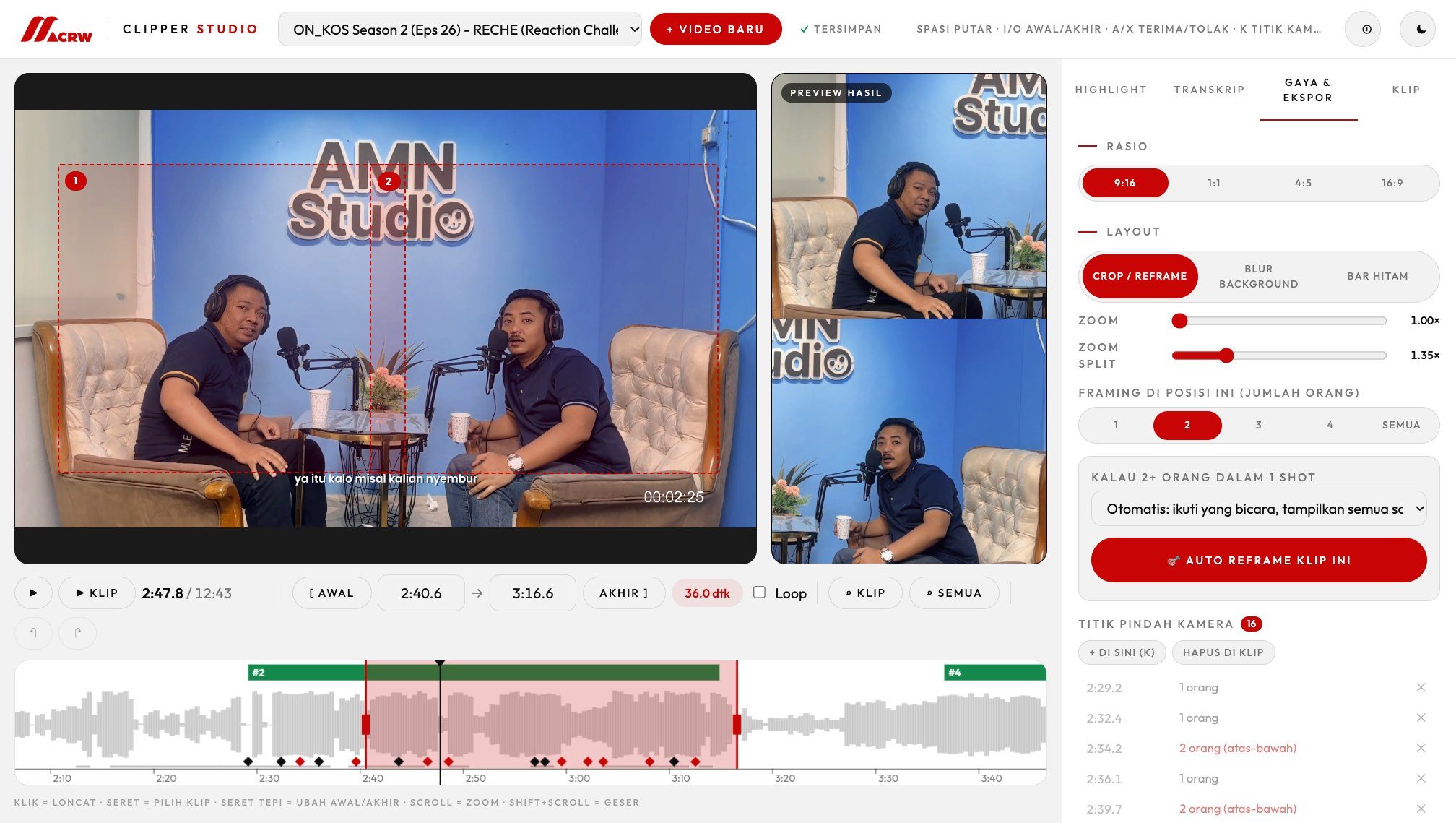
Read the editor
- Left: the original video with the framing boxes. Right: the finished clip, live, with captions.
- Timeline: the sound wave, the candidates on top (green = accepted), the selected clip in red, and the camera-switch points as diamonds.
- “2 orang (atas-bawah)” in the list means both people are stacked from that point on.
- ✓ Tersimpan at the top: every change is saved to the project by itself. ↶ / ↷ undo and redo.
Tips
- Transcribe first. Highlights also read the words (wkwk, anjir, gila, jancok…) once there is a transcript.
- Mixed Indonesian and Javanese? Try both languages on one episode and keep the one that reads better.
- A wrong name everywhere? Use find and replace in Transkrip (for example Bangga → Angga); the name is remembered for the next video.
- Captions over a face? Drag the caption on the preview: it moves for that part only.
- No NVIDIA card on Windows? Pick the Cepat model; it is much quicker on the processor.
Keyboard shortcuts
| Key | Action |
|---|---|
Space | Play or pause |
I / O | Set the start or end of the clip |
← / → | Back or forward 1 second (with Shift: 5 seconds) |
A / X | Accept or reject the open candidate |
K | Add a camera-switch point here |
L | Loop the clip |
⌘Z / ⇧⌘Z | Undo or redo (Windows and Linux: Ctrl+Z / Ctrl+Y) |
Troubleshooting
Still stuck? Send me a message and tell me which computer you use.
“Persiapan gagal” (setup failed)
The first start needs internet to download the program files. Check the connection and open the tool again; it continues where it stopped.
The Mac says the app cannot be opened
The app is free and not from the App Store, so Apple has not checked it. Click Done, not Move to Trash. Open System Settings › Privacy & Security, scroll to the bottom, click Open Anyway, and confirm with your password (once). No button there? Double-click the app again first: it only shows for about an hour after a try. Still blocked? Open Terminal, type xattr -dr com.apple.quarantine followed by a space, drag MACRW Clipper.app into the window, and press Return.
The Mac version says it needs an Apple chip
This build is made for M1 and newer Macs. Older Intel Macs are not supported yet.
The editor did not open
Type http://127.0.0.1:5055 into your browser. Keep the Terminal or Command Prompt window open while you work; closing it stops the tool.
A link does not download
Sites change often, so the downloader updates itself every week. Close the tool and open it again to update, or download the video yourself and drag the file in. Only clip videos you have the rights to.
The transcript gets words or names wrong
Add names and special terms in Nama & istilah before the transcript, try the other language, and fix the rest with find and replace or by clicking the sentence.
I closed the tool while clips were exporting
Open it again: the clips that were waiting in the queue continue by themselves. Half-finished files are removed, so nothing broken ends up in your clips.
Where are my clips?
Mac: Movies › MACRW Clipper. Windows and Linux: Videos › MACRW Clipper. Each video has its own folder with a clips folder inside; the Klip tab opens it for you.
How do I remove the tool?
Delete the downloaded folder, your projects in Movies or Videos › MACRW Clipper, and the program folder:
Mac ~/Library/Application Support/MACRW Clipper Windows %LOCALAPPDATA%\MACRW Clipper Linux ~/.local/share/macrw-clipper
Let's turn it into something meaningful.